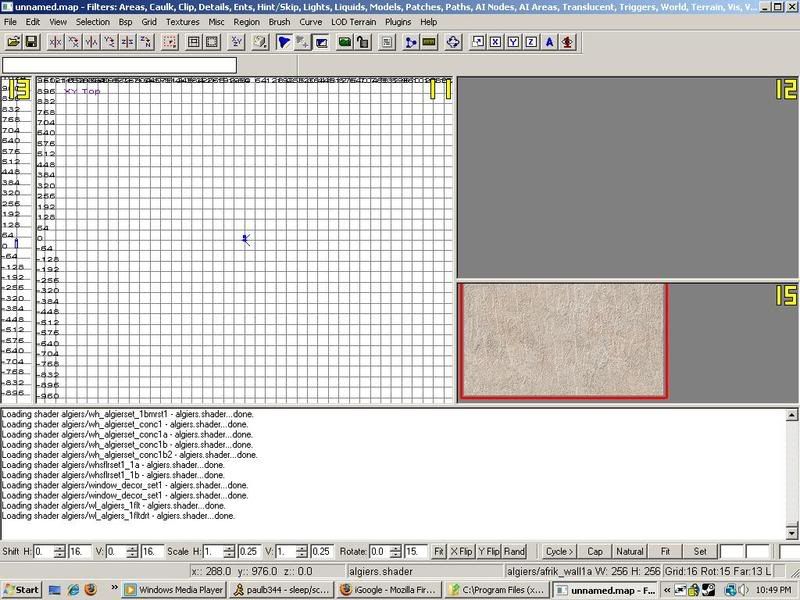
looks like he did rook as the algiers shaders are shown loaded . i hate that radiant window set up style but possibly if he hits ''N'' + ''T'' he'll get the full window with the scrollbar on the side . he may just think that because he only sees one texture displayed in that small window he only has one .
omg, i just saw this: i wonder if ''N'' + ''T'' was set up as a reminder that it's for entity .
Dude, those messages about the shaders are the ones that appear when you start Radiant up, not the ones that pop up when choosing a shader from the menu.
You can scroll the texture window by pressing the right mouse button inside the texture window, holding it and moving it up/down.
Rookie One.pl wrote:Dude, those messages about the shaders are the ones that appear when you start Radiant up, not the ones that pop up when choosing a shader from the menu.
huh ?
(when raidiant starts up) the first ''batch'' all have a ''scan file'' prefix and the next ''batch'' doesn't list algiers as a .shader . only after textures is clicked on and algiers selected do you get those messages...
Last edited by PKM on Thu Jan 31, 2008 5:48 pm, edited 1 time in total.
I had something of a similar problem when I first used radiant before I took all my custom files out of my main. Do you have any custom maps or skins or anything in your main folder?
thx for the replys guys, the filtering and adding texture scroll worked. The reason why i installed moh radiant is becuase ea released the .map files. And i am recreating all moh maps to cod4. SO im using moh textures, but its hard to find the textures, so i am loading up the map in moh radiant and pressing S so it tells me the texture name
Make a brush and put it over your whole map. Then go "select-complete tall"
And there you have it radiant crashes. Just kidding, but when your whole map is selected you have to move it extremely slow or radiant will crash. Save your map before trying this!
@PKM: Oh, crap. I stand corrected. Didn't read the console output carefully enough. But all shader files are scanned at load time as well, and that's what got me confused.
@Paul & Erick: You can also choose Select inside. There are a couple options. Radiant will not crash when moving the entire map, even when it seems to do. It's just doing a lot of calculations. Truth is the version of Q3Radiant that MoHRadiant is based on was just a "try to work at all without crashing" one, and as such was not optimized at all. GtkRadiant is a huge improvement in terms of efficiency and speed; unfortunately, it doesn't support MoHAA.
Rookie One.pl wrote:@PKM: Oh, crap. I stand corrected. Didn't read the console output carefully enough. But all shader files are scanned at load time as well, and that's what got me confused.
@Paul & Erick: You can also choose Select inside. There are a couple options. Radiant will not crash when moving the entire map, even when it seems to do. It's just doing a lot of calculations. Truth is the version of Q3Radiant that MoHRadiant is based on was just a "try to work at all without crashing" one, and as such was not optimized at all. GtkRadiant is a huge improvement in terms of efficiency and speed; unfortunately, it doesn't support MoHAA.
lol i was asking if there was the button, because i cant seem to find it on the tool bar
Rookie One.pl wrote:@PKM: Oh, crap. I stand corrected. Didn't read the console output carefully enough. But all shader files are scanned at load time as well, and that's what got me confused.
you're beautiful rook . i do that all the time myself . the whole time , even when i made the screenshot and even when bd verified i couldn't help thinking ...rook can't be wrong, what did i miss, rook is never wrong, what did i miss... LOL . see how important you are to mohaa modding ?
PKM wrote:i do that all the time myself . the whole time , even when i made the screenshot and even when bd verified i couldn't help thinking ...rook can't be wrong, what did i miss, rook is never wrong, what did i miss... LOL . see how important you are to mohaa modding ?
Lol. Nobody is perfect. What's the lesson? NEVER take me being correct for granted, especially these days when I'm basically out of MoHAA modding.