radiant problem

General Discussion about Medal of Honor: Allied Assault and Pacific Assault.

Moderator: Moderators

Post Reply
PKM
General
Posts: 1888
Joined: Tue Aug 09, 2005 4:43 pm
Location: Philadelpia but stuck in San Antonio TX (hell)

radiant problem

Post by PKM »

downloaded mohradiant from nemesis site and installed (on new cpu) . seems to run fine however now problems are starting to crop up .
1. if i highlight a brush/face and then click on another brush to copy the texture, nothing happens .
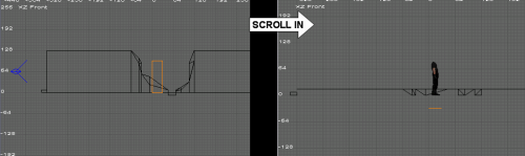
2. i created a wall of brushes with a ai model near it . if i move toward the wall it 'shrinks' below the height of the ai model....
Image

3. recently whenever i start up radiant it informs me i need to point basepath to the correct directory, it is (C:\Program Files\EA GAMES\MOHAA)* .

i'm wondering if it was because the radiant files set up file came from nemesis's site and he had those 'hacker' problems (the file might have been corrupted ?) either or now i notice there is not an uninstall program in the mohaa tools folder , in fact non of my unistall programs even register mohaa tools (regcleaner, myunistall..add/remove...) . any ideas on how to simply uninstall ?


*i do use a CD-crack with the orignal mohaa.exe in mohaa directory instead of mohaa\main .

i'm not f****** angry, i'm from philadelphia .
Image
User avatar
bdbodger
Moderator
Posts: 2596
Joined: Tue Feb 25, 2003 7:34 am
Location: canada
Contact:

Post by bdbodger »

1. Select a face and use the MMB on another face to copy it .

2. Don't know how are you moving in 3D ? with what mouse button ?
LMB will move the wall or if above or below it etc will resize it . RMB will move you with the 2 in the eye .

3. In preferences choose load last project on open .
Image
Rookie One.pl
Site Admin
Posts: 2752
Joined: Fri Jan 31, 2003 7:49 pm
Location: Nowa Wies Tworoska, Poland
Contact:

Post by Rookie One.pl »

Ad. 1. This behaviour depends on your Radiant settings, namely the number of mouse buttons in the preferences dialogue and the eye icon on the toolbar. Click it until the behaviour is as desired (I use the one with a red number 2 over it).

Ad. 2. Now this looks like a serious rendering problem. What's your video card and system? Are the drivers up to date?

Ad. 3. Just like Bodger said. :)
Admin
Image
Image
Honour guide me.

here's my stuff - inequation.org | here's where I work - thefarm51.com
PKM
General
Posts: 1888
Joined: Tue Aug 09, 2005 4:43 pm
Location: Philadelpia but stuck in San Antonio TX (hell)

Post by PKM »

gonna start off backwards with bd's suggestion on 3 .*

settings for mouse is 3 button and 'eye icon' is marked with red two** .
still having the shrink problem . moving in 3d via the arrow keys and d/c . 2d with the scroll wheel to zoom in/out .

cpu is older:
sony vaio
intel pentium 4
2.8 ghz
504mb ram
143gb hard drive
plug/play intel graphics (haven't switched over the graphics card yet)


*clicking 'open last project' worked .
** took a wild stab and hit the scroll button (3rd button) and it copied the texture from one face to the other .
i'm not f****** angry, i'm from philadelphia .
Image
Rookie One.pl
Site Admin
Posts: 2752
Joined: Fri Jan 31, 2003 7:49 pm
Location: Nowa Wies Tworoska, Poland
Contact:

Post by Rookie One.pl »

Try switching to the 2-button mode, it should give the right mouse button the ability to copy textures. :)
Admin
Image
Image
Honour guide me.

here's my stuff - inequation.org | here's where I work - thefarm51.com
PKM
General
Posts: 1888
Joined: Tue Aug 09, 2005 4:43 pm
Location: Philadelpia but stuck in San Antonio TX (hell)

Post by PKM »

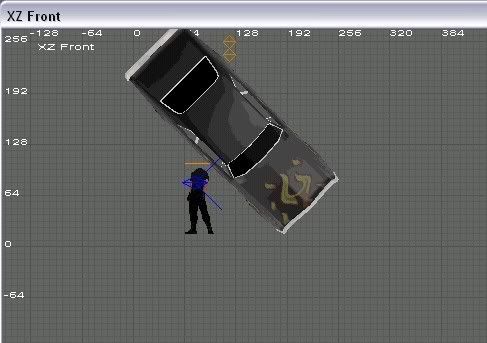
the switching to two button worked however in addition to the shrinking brushes, i now have this....

Image
i'm not f****** angry, i'm from philadelphia .
Image
Rookie One.pl
Site Admin
Posts: 2752
Joined: Fri Jan 31, 2003 7:49 pm
Location: Nowa Wies Tworoska, Poland
Contact:

Post by Rookie One.pl »

I don't really get what's wrong with that picture. Well, yeah, the car looks strange, but still. :? What's the problem?
Admin
Image
Image
Honour guide me.

here's my stuff - inequation.org | here's where I work - thefarm51.com
PKM
General
Posts: 1888
Joined: Tue Aug 09, 2005 4:43 pm
Location: Philadelpia but stuck in San Antonio TX (hell)

Post by PKM »

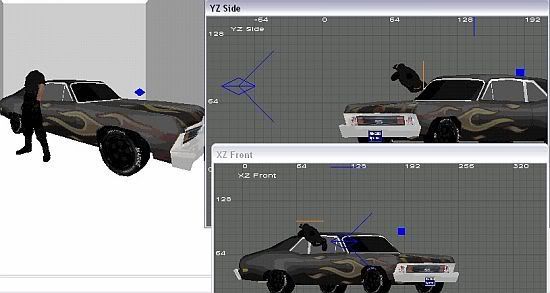
that's the front view . the player model is standing correctly however in that view/window, the car model, which the player model is standing next to....is at the wrong angle . i should have posted the camera view also .

Image

can i delete radiant from the mohaa tools folder or the whole mohaa tools folder (again, it's not showing up in any of my uninstall programs ) ?
and could i just copy the installed radiant from my old computer over to this computer ?
i'm not f****** angry, i'm from philadelphia .
Image
Rookie One.pl
Site Admin
Posts: 2752
Joined: Fri Jan 31, 2003 7:49 pm
Location: Nowa Wies Tworoska, Poland
Contact:

Post by Rookie One.pl »

As far as I can remember, MoHRadiant originally came in a self-extracting ZIP archive, so by definition it doesn't have an uninstaller. :) You can safely copy the whole Radiant directory from your old PC.
Admin
Image
Image
Honour guide me.

here's my stuff - inequation.org | here's where I work - thefarm51.com
PKM
General
Posts: 1888
Joined: Tue Aug 09, 2005 4:43 pm
Location: Philadelpia but stuck in San Antonio TX (hell)

Post by PKM »

1. erased the mohaa tools folder then copy and pasted from my old cpu..same problem .
2. erased the mohaa tools folder, downloaded new version from atomicgamer.com, extracted...same problem
3. restarted cpu, started new map....seems brush shrinking problem has gone away as well as weird model position problem .

still have a few slight bugs (brushes near a model disappear when zoom/scrolling towards model...) but i'm thinking that may be my settings and have something to do with my video settings on cpu . we'll see .
thanks for the help rook & bd .
i'm not f****** angry, i'm from philadelphia .
Image
Post Reply