i always thought ...what is available/possible in MOHRadient should give mappers ideas for new maps.
This is a reason wanting to know more about MOHRadient surface properties Flags.
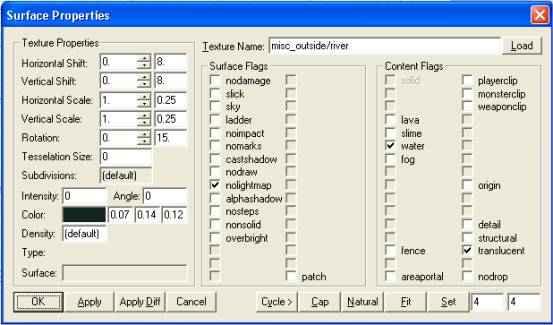
Surface Properties (puch S when a brushface is highlighted) as we know
from a tutorial -> (Water :: Dr ABAP) on .MAP
it describes how to set flags for brushface textured with misc_outside/river(watertexture) (other 5 side of the brush in common 'skip' texture)
Surface Flags:
v nolightmap
Contenct Flags:
v water v transculent
- i ask if any1 knows about a flag - Post - explain a bit what possible -
THANKS!
Last edited by Cigs on Wed Jun 16, 2004 9:33 pm, edited 1 time in total.
Show Non-Shader Textures was allready Disabled.
but i donno what you mean. have to write a *.shader script ? give it an alpha channel in there, add blendfunc blend?
how? wich *.shader script do I copy and adjust? do i have to write e new one? --> u see i don't know how
what i did do: Surf Prop:
v alphashadow
v playerclip
v detail
but the black is still there & bullets don't collide on the metal.
player can stand on.
texture in use: general_industrial/crossbracing1_set1spl
ok I changed the texture to general_industrial/crossbrace1 wich looks just the same. guess this IS a Shader Texture! right!
black is invisible. no metal collision. but I can just make that using common/metal texture
info
Surf Props: (were automaticly applied when texture was applied)
v alphashadow
v nonsolid
v playerclip
v monsterclip
I don't think you can change the surface properties of a texture, with the surface inspector, if it already has them set in a shader file for that texture. But, I may be wrong.




 ?
?


