
Hi guys, I'm about to try my hands on map scripting for the first time...
I have links to some great 'working lift' tutorials to start work on a lift, but just a quick question, can I create a working lift with counterweight ? And how would I facilitate for it mapping-wise ?
More map details in this thread
Lift with counterweight ? (Allied Assault)
Moderator: Moderators
-
Bjarne BZR
- Site Admin
- Posts: 3298
- Joined: Wed Feb 05, 2003 2:04 pm
- Location: Sweden
- Contact:
Yes you can. But it takes some scripting an perhaps a bit of ccalibration of the movements to get it right.
Basically you just tell the counterweight to go down at the same time as you tell the elevator to go up in the script.
Just throw in the questions as you get the problems
Basically you just tell the counterweight to go down at the same time as you tell the elevator to go up in the script.
Just throw in the questions as you get the problems
Admin .MAP Forums

Head above heels.
Head above heels.

cables
The cables may be a poblem because they would have to stick out above the shaft. If the elvator shaft is not super high, you can use overlapping cable brushes. You could also use func_beam for the cables, but that is very advanced.
It might be easier to just let the counterweight run up and down on fixed cables--cables that don't move.
It might be easier to just let the counterweight run up and down on fixed cables--cables that don't move.
Tom Trude,

-
Bjarne BZR
- Site Admin
- Posts: 3298
- Joined: Wed Feb 05, 2003 2:04 pm
- Location: Sweden
- Contact:


Thank you
/forum/viewtopic.php?t=8321&highlight=
One other thing if you are useing beams like this . You need to make the func_beam in radiant and have it target a script origin . The script_origin can move and the beam will always go from the func_beam to the script_origin but it does not seem to work when spawned . at least not unless you run a thread that keeps looping with something like this
local.p = trace local.spot.origin local.groundspot_target.origin 0
local.beam endpoint local.p
or
local.beam endpoint $mything.origin
not sure right now what happens if you move the func_beam and not the script_origin
/forum/viewtopic.php?t=8321&highlight=
One other thing if you are useing beams like this . You need to make the func_beam in radiant and have it target a script origin . The script_origin can move and the beam will always go from the func_beam to the script_origin but it does not seem to work when spawned . at least not unless you run a thread that keeps looping with something like this
local.p = trace local.spot.origin local.groundspot_target.origin 0
local.beam endpoint local.p
or
local.beam endpoint $mything.origin
not sure right now what happens if you move the func_beam and not the script_origin


elevator
Try the elevator in my "test_pointer" tutorial map. You can find it by clicking on my signature logo.
It uses a pointer to select the floors on a control panel. If that idea were combined with "nuggets Global Elevator", you would have a very fancy multi-floor elevator, indeed.
It uses a pointer to select the floors on a control panel. If that idea were combined with "nuggets Global Elevator", you would have a very fancy multi-floor elevator, indeed.
Tom Trude,
tltrude, I did explore your pointer map and although it's a great elevator-system (i would use it in any other elevator) there's no need to use it on my current elevator, as there's ony one level in height difference... thanks though, much appreciated... superb stuff & the rockets are a lot of fun!
Now on with the problem;
Facts: There are no doors on my elevator and no 'cabin'-switch (only the lower & upper switch)
By editing the script Bjarne used in combination with his "Rjukan Project" advanced elevator tutorial... well editing... more like: // blah, blah...
Anyways, I've basically used "//" on every line (including the animation threads) wich I thought where not needed... the lift is functioning, but only once... every other attempt to use one of the two triggers gives you the message "elevator busy" (EDIT: "already in use") This seems pretty logical as there is no mentioning in the script what the lift should do after reaching the other floor (at least that's my understanding of the script)
Can anyone help me adjust the script to facilitate it running my elevator ?
Btw. I'm using the following model as a switch (both trigger up&down)
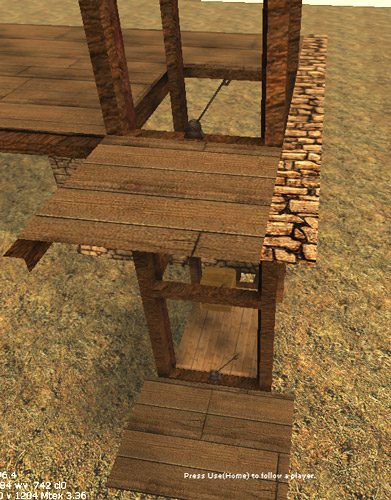
Or if needed, give my elevator test map a spin (both files in the .zip need to be placed in "main/maps/dm/")
Elevator_testmap
Oyeah... expect me to bother you guys again with the animations for the 'switches'...
Now on with the problem;
Facts: There are no doors on my elevator and no 'cabin'-switch (only the lower & upper switch)
By editing the script Bjarne used in combination with his "Rjukan Project" advanced elevator tutorial... well editing... more like: // blah, blah...
Anyways, I've basically used "//" on every line (including the animation threads) wich I thought where not needed... the lift is functioning, but only once... every other attempt to use one of the two triggers gives you the message "elevator busy" (EDIT: "already in use") This seems pretty logical as there is no mentioning in the script what the lift should do after reaching the other floor (at least that's my understanding of the script)
Can anyone help me adjust the script to facilitate it running my elevator ?
Btw. I'm using the following model as a switch (both trigger up&down)
Or if needed, give my elevator test map a spin (both files in the .zip need to be placed in "main/maps/dm/")
Elevator_testmap
Oyeah... expect me to bother you guys again with the animations for the 'switches'...

.map
Please include the .map file in the zip file. Elevators can be done in many different ways, so the first thing you should do is figure out how you want the controls to work.
Having such a complicated script for a two story elevator is kind of silly when the whole thing can be done without scripting--using a func_door. But, if your goal is to learn scripting, you should start with a simple script. Here is a basic elevator script that does not use waypoints and returns to the bottom by itself.
It requires only one trigger_use that stretches between both switches. I may not have the targetnames right. The alias sound name "lighthouse_run" works in all game types and does not require a local.master workaround.
See if you can figure out how to add switch animation lines to the thread. Note: both switches can have the same targetname to reduce the number of lines required. That type switch, uses the anim commands "move" and "idel"--press on the Anim: +- buttons (key N) to see the commands.
Having such a complicated script for a two story elevator is kind of silly when the whole thing can be done without scripting--using a func_door. But, if your goal is to learn scripting, you should start with a simple script. Here is a basic elevator script that does not use waypoints and returns to the bottom by itself.
Code: Select all
elevator_mover:

     $lift_trigger_up waittill trigger  // Waits for trigger event

     $lift loopsound lighthouse_run
     $lift moveup 336
     $lift waitmove
     $lift stoploopsound

     wait 10

     $lift loopsound lighthouse_run
     $lift movedown 336
     $lift waitmove
     $lift stoploopsound

     goto elevator_mover

end
See if you can figure out how to add switch animation lines to the thread. Note: both switches can have the same targetname to reduce the number of lines required. That type switch, uses the anim commands "move" and "idel"--press on the Anim: +- buttons (key N) to see the commands.
Tom Trude,
Sorry for the delay, was having some difficulties with my ISP... all seems to be solved now.
tlrude, lemme try to implement the 'simplified' script you provided first.
Btw. I'm thinking of scripting some more events later on... will it become a problem with this new script ? One idea is to make all scripted events 'toggle-able' by the server admin...
tlrude, lemme try to implement the 'simplified' script you provided first.
Btw. I'm thinking of scripting some more events later on... will it become a problem with this new script ? One idea is to make all scripted events 'toggle-able' by the server admin...
thread
Actually what I posted is not a script. It is a thread and a script can have as many threads as are needed for the map. The threads can be started in the scripts "main:" thread.
I don't know if threads can be set serverside but, the server can run different versions of the script using the same map--just use a different name for each set.
I don't know if threads can be set serverside but, the server can run different versions of the script using the same map--just use a different name for each set.
Tom Trude,