Post your scripting questions / solutions here
Moderator: Moderators
chrisredfield003
Sergeant
Posts: 56 Joined: Thu Oct 05, 2006 1:00 am
Contact:
Post
by chrisredfield003 Mon Oct 16, 2006 11:05 am
is it possible to flip a skin or image thru scripting
i made a jetpack kind of mod i added fire coming
form one of the tubes and the fire should be upside down
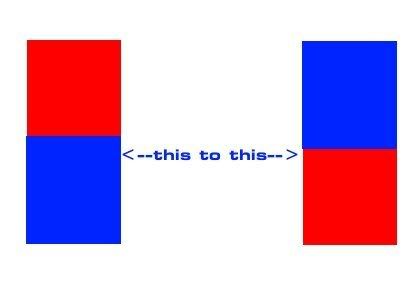
since i turned the model of the fire upsidedown..........but sadly thats not the case so my question is thru scripting it should be possible to flip a texture
for example like this
without having to go thru all 25 images of the fire and manualy turning them myself and than having to make a totaly new fire script of my own and all the steps of manualy doing that...........
jv_map
Site Admin
Posts: 6521 Joined: Tue Sep 03, 2002 2:53 pmLocation: The Netherlands
Contact:
Post
by jv_map Mon Oct 16, 2006 11:11 am
tcMod scale 1.0 -1.0
In the shader (inside a texture stage)
Oh btw many graphic programs (even
free ones ) come with batch processing tools that can perform the same operation on many images in no time.
chrisredfield003
Sergeant
Posts: 56 Joined: Thu Oct 05, 2006 1:00 am
Contact:
Post
by chrisredfield003 Mon Oct 16, 2006 1:17 pm
i notice alot of scripts are asked to be fixed here but rarely is it understood or fixed first post after question so ill get my script here in a sec and hopefuly u can take a look......
chrisredfield003
Sergeant
Posts: 56 Joined: Thu Oct 05, 2006 1:00 am
Contact:
Post
by chrisredfield003 Mon Oct 16, 2006 1:25 pm
fire_front
chrisredfield003
Sergeant
Posts: 56 Joined: Thu Oct 05, 2006 1:00 am
Contact:
Post
by chrisredfield003 Mon Oct 16, 2006 2:09 pm
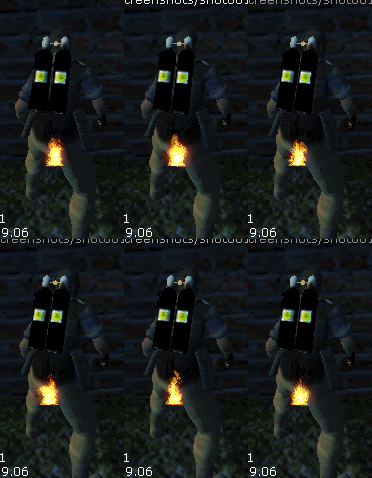
to give another idea of what im looking for
that flame is a model and no matter wichway i turn the model itself the image keeps coming up right side up =/
what i need is for the textures to show up upside down =/
jv_map
Site Admin
Posts: 6521 Joined: Tue Sep 03, 2002 2:53 pmLocation: The Netherlands
Contact:
Post
by jv_map Mon Oct 16, 2006 2:22 pm
Hehe nice pic.. gonna have to sit on blisters now
Does
Code: Select all
fire_front
{
  qer_editorimage textures/effects/flamer_01.tga
  nopicmip
  nomipmaps
  deformVertexes autosprite
  cull none
  {
    animMapPhase 15 0 ...blablabla... :P
    tcMod scale 1.0 -1.0
    blendfunc add
  }
}
do what you want?
chrisredfield003
Sergeant
Posts: 56 Joined: Thu Oct 05, 2006 1:00 am
Contact:
Post
by chrisredfield003 Mon Oct 16, 2006 2:36 pm
jeez u fixed it first try ^^ you saved me from having to make....
chrisredfield003
Sergeant
Posts: 56 Joined: Thu Oct 05, 2006 1:00 am
Contact:
Post
by chrisredfield003 Mon Oct 16, 2006 2:59 pm
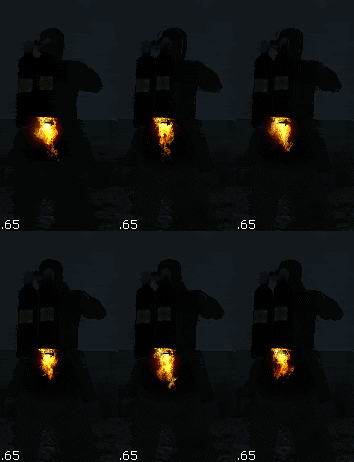
i got the effect i was looking for thanks to you
its not as clean as it will be but this is the basic idea of the gearmodel.
GiffE1118
Warrant Officer
Posts: 137 Joined: Fri Aug 05, 2005 12:14 am
Contact:
Post
by GiffE1118 Mon Oct 16, 2006 11:42 pm
chrisredfield003 wrote: to give another idea of what im looking for
that flame is a model and no matter wichway i turn the model itself the image keeps coming up right side up =/
what i need is for the textures to show up upside down =/
Beans?
why is his ass on fire
new pic looks nice u should add another fire to the send one.
chrisredfield003
Sergeant
Posts: 56 Joined: Thu Oct 05, 2006 1:00 am
Contact:
Post
by chrisredfield003 Mon Oct 16, 2006 11:52 pm
yup the second pic is just showing i got my small problem out of the way it
was causing a creators block LoL
how the fire has perfect placing and thers been model added to the pack
the jet is in its rough draft steps just gettin the basic idea together befor i put
a decent model together
i have more to come tomorow im not dead yet ^^