Objects through skies
Posted: Fri May 16, 2008 4:33 pm
Are there any tricks to prevent seeing objects on the other side of a skybox?
Ok that's my problem then. I had a tunnel going through one sky box to anotherPKM wrote:yes, properly create a skybox ?
screenshot because you should not being seeing anything ''through'' a skybox. sounds like your skybox isn't a box but a different shape .
 . I guess I'll have to create one big sky box or a portal or something. Thanks!
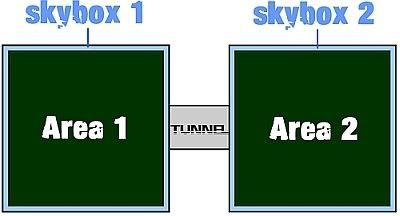
That's what I did, but you have to make a hole in the sky box to get through. I tried it without a tunnel and then with. Apparently, when I do make a hole it makes it so you can see through to the other sky box. Hopefully the vis thing will workPKM wrote:if you have a tunnel going from one area of the map to another you can just create two square sky boxes .
 .
.Ok. I learned somethings I didn't know before, thanks. It seems kind of dumb to have to create a huge vis brush (or whatever) just because of a hole. I'll try somethings myself, but is there anyway to block the the line of site for the compiler? Maybe texture you can walk through... like water.neillomax wrote:This is where vis comes in. Fill each area with a different vis brush ( cube).
Select one of them and hit the letter "k". It will automatically point to the other vis brush........I think ...... you'll have to read up on it because it's been a while for me. You can find the data on this site under "all of them" on the front page.
/tutorials.php?category=All
here
Thanks for the help.