Curve and path using patch mesh

If you're looking for mapping help or you reckon you're a mapping guru, post your questions / solutions here

Moderator: Moderators

Post Reply
chizzo
Lance Corporal
Posts: 18
Joined: Sat Mar 03, 2007 8:01 am

Curve and path using patch mesh

Post by chizzo »

I have a problem when I want to make a curve corner with a path.

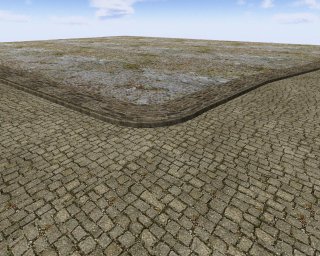
I can bend the road but I don't know how to curve the path 'cause it should not be at the same level but a little bit up the road and I don't want a blank space between the road and the path.

Image

I can bend the "brown" patch mesh but I don't deal with the green one. My problem is where I use red.
Any ideas how to do that? I want to marge both patch but I don't know how to, I use brushes for the green part but it doesn't look good. So I want to know how to do a good curve road and also a curve path like this:

Image
jv_map
Site Admin
Posts: 6521
Joined: Tue Sep 03, 2002 2:53 pm
Location: The Netherlands
Contact:

Post by jv_map »

Hi chizzo,

That's a difficult undertaking, but it's possible.

If you want the pavement to exactly match the road in the bend, it'll have to be made from patch meshes as well. Place it a bit higher than the road. To fill up the vertical gap, use a third patch mesh. When you align the control points properly, you should get a perfect match.

Unfortunately a presumably inevitable problem with such a construction is that there is a risk of 'sparkling' (visual holes) that occurs only when you are far away from the curve. In theory this does not occur when the control points (and the complexity) of two adjoint patch meshes match. In practice it usually occurs anyway. A possible solution is to let the meshes partially overlap on concave edges, i.e. let your road 'cut' some distance into the pavement. Often this fixes the sparkling, but your lighting may not look so good. I'm afraid that's about as good as it gets.

Good luck! :)
Image
jv_map
Site Admin
Posts: 6521
Joined: Tue Sep 03, 2002 2:53 pm
Location: The Netherlands
Contact:

Post by jv_map »

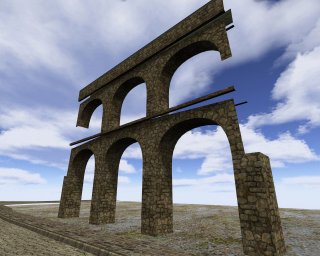
Just put together this pk3 with a map I had been working on long ago. I seem to have a way too short attention span to be able to finish a map, but at least the unfinished product sports some of the features you were trying to create :).

Have a look if you like, .map file is included. Lots of curves :)

Image Image

[ download ]

P.S. I lost the original shader files :(. I made a quick replacement so you can run the map and view it in radiant nicely, but I'm not sure if it will compile properly with these shaders.
Image
chizzo
Lance Corporal
Posts: 18
Joined: Sat Mar 03, 2007 8:01 am

Post by chizzo »

Thanks a lot m8.


PS: Sorry for my weird english :oops:
Post Reply