Page 1 of 2
locprint and printing time
Posted: Tue Apr 28, 2009 12:33 pm
by SilentAngel
How to know the localization number to use this func "locprint"?
I never used it before..
Also I need to print a variable that change a lot during the game..some ideas?
Posted: Tue Apr 28, 2009 3:03 pm
by SilentAngel
more exactly I need to print a variable..it has to be always printed on the screen, even if it changes of value..is that possible?
Posted: Tue Apr 28, 2009 3:13 pm
by Aprop
iprintln "level.foo is: " level.foo
Posted: Tue Apr 28, 2009 3:23 pm
by SilentAngel
well I'm trying to put the message on the right top side of the screen, so I need "locprint" I think, also if I do that:
iprintln "level.foo is: " level.foo
the message will disappear after few seconds..
I thought at this:
(in this case I use iprintln becouse I dunno how to use locprint, lol)
Code: Select all
while(local.timeleft > 0)
{
      iprintln "myvar is " + local.spawns
}
but I remember when I tried something similar the message was spamming, is that normal?
Posted: Tue Apr 28, 2009 3:28 pm
by Aprop
add wait... wait 5 for example, where 5 is number of secs
Posted: Tue Apr 28, 2009 3:37 pm
by $oldier Of Ra
What about huddraw?
Posted: Tue Apr 28, 2009 4:02 pm
by SilentAngel
well waut 5 is a possible solution, but it would be better without pause, becouse it has to display an important variable..
SoR what you mean exactly?
Posted: Tue Apr 28, 2009 4:46 pm
by $oldier Of Ra
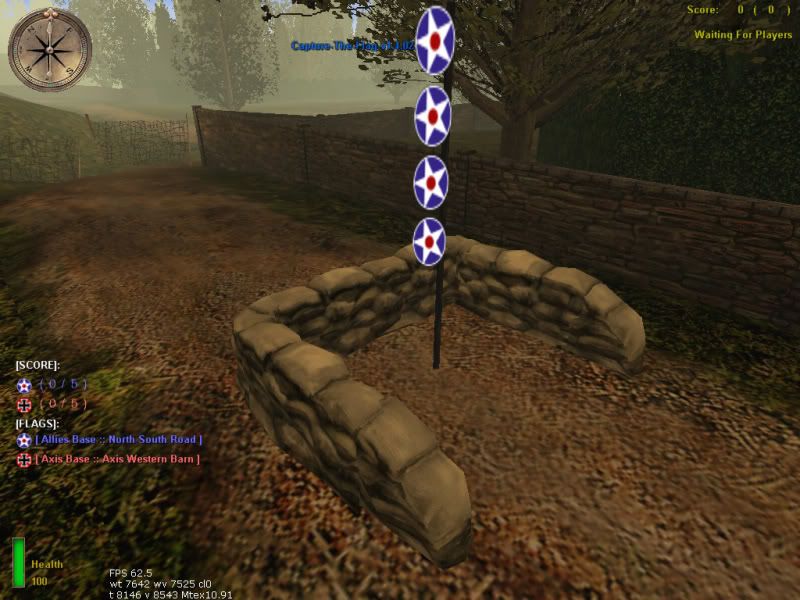
You can display hud elements with huddraw (for all players to see).
Like in this screenshot:
http://i95.photobucket.com/albums/l127/ ... ot0052.jpg
These elements will stay onscreen permanently, until I choose to turn them off. You must loop the huddraw commands, to update the displayed variables as well as to display it to new players.
Posted: Tue Apr 28, 2009 4:53 pm
by SilentAngel
that's exactly what I need, I thought it is done with locprint but i'm wrong, huddraw also make the massages fixed on the screen as I need i think.
Could you please explain me how use it? I was looking for some info but without results..

Posted: Tue Apr 28, 2009 4:58 pm
by $oldier Of Ra
Locprint can only be used once at a time (will be overwritten if it's already displayed) and properties such as font and colour cannot be changed.
The use of the huddraw element is explained in the huddraw document supplied with radiant:
Description of the use of the huddraw set of script commands
------------------------------------------------------------
The huddraw script commands allow you to draw up to 256 different graphic icons on the player's hud.
The element to adjust with each command is specified by an index number in the range of 0 to 255.
They currently broadcast to all players, but that could be changed if the need arises.
Commands Summary
----------------
huddraw_shader <index> <shader name>
This sets the shader to use for a particular huddraw element.
huddraw_align <index> <horizontal> <vertical>
This sets the alignment of the huddraw element.
Valid values for horizontal alignment are "left", "center", and "right".
Valid values for vertical alignment are "top", "center", and "bottom".
huddraw_rect <index> <X position> <Y position> <width> <height>
This sets the position and size of the huddraw element. X and Y specify the position of
the upper left corner position. Higher values of X move it to the right, and higher
values of Y move it down. When you set the alignment, the XY position specified is
relative to that alignment. For example, if you align it to the right edge of the hud,
the X position should be less than zero so that it the upper left corner will be brough
back to the left onto the screen.
huddraw_virtualsize <index> <virtual>
This let's you set the huddraw element's size and position according to a virtual screen
resolution of 640x480. What this means is that it lets you treat the hud like it's always
at 640x480, and it will be properly resized and positioned according to the actual resolution.
huddraw_color <index> <red> <green> <blue>
This set the color of the huddraw element. Each color channel should be between 0 and 1.
huddraw_alpha <index> <alpha>
This set the alpha of the huddraw element. It should be set between 0 and 1. This is also
used to turn off a huddraw element that is no longer wanted by setting the alpha to 0.
huddraw_string <index> <string>
This sets the huddraw element to display a string instead of a shader graphic. The size
of the font can not be adjusted, but the color and alpha settings do affect the text.
The width and height parameters of huddraw_rect are only used for alignment centering,
Not for setting the size of the string.
huddraw_font <index> <fontname>
This sets the font for a string displaying huddraw element to use. The names of available
font can be gotten from the game/main/fonts folder. The file names of the .ritualfont files
in there are the names used for the fonts.
Like I said, before, huddraw must be in a loop with a reasonable wait of 1/2. Next, you need to use huddraw_align to make the element displayed properly on every resolution (don't use virtualsize) but by doing so, the "centre" of your element will change. Therefor, you will have to change your rect.
Remember, to execute huddraw
after waittill spawn and remember that huddraw elements can be displayed "outside of the screen". So at first don't think it's not working.
Posted: Tue Apr 28, 2009 5:12 pm
by SilentAngel
ty Solider
Posted: Tue Apr 28, 2009 5:15 pm
by $oldier Of Ra
Here's an example to get you started:
Code: Select all
		huddraw_font 50 facfont-20
		huddraw_align 50 "center" "top"
		huddraw_rect 50 -90 50 100 100
		huddraw_string 50 "Capture-The-Flag v1.4.02"
		huddraw_color 50 0.0 0.0 0.0
		huddraw_alpha 50 0.5
Posted: Tue Apr 28, 2009 5:18 pm
by SilentAngel
ok, I'll do some test
Posted: Tue Apr 28, 2009 5:43 pm
by SilentAngel
index is a sort of nale for the hud? I mean, it's what identify it?
Posted: Tue Apr 28, 2009 6:12 pm
by $oldier Of Ra
Index is any number you choose. From 1 to 255. It allows you to use 255 different huddraw elements. Of course all huddraw commands for one same huddraw element must have the same index.