Page 1 of 2
Areaportals
Posted: Tue Jun 15, 2004 6:36 am
by Wheat
Okay, I read up on this but I have some questions I could not find answers for.
It seems like I can only compile my map with fast vis otherwise it may take days for it to compile. If I use the areaportals on my doors, and use the fast vis, will the aereaportals still work? Plus, I get an error during the compile: "areaportal does not touch two areas." Second, I found the command for it to see if it is working while runnin in the game, but when I use it, it says something like, "cheat mode enalbed." and then it won't work. I am worried about this because I just remade my mountains, which are huge, and that caused a big drop in the fps. So, I'm looking for ways to get the best performance out of my map without making any sacrafices to what I already have.
Posted: Tue Jun 15, 2004 6:45 am
by bdbodger
Do a search this question was just asked not so long ago .
Posted: Tue Jun 15, 2004 7:28 am
by Wheat
I have done a search and it found nothing. I then browsed through the first five pages of post on these forums and found nothing. Found answers to other problems I have, but not the ones pertaining this post. If you know of it, can you past a link here? I had no luck. Sorry.
Posted: Tue Jun 15, 2004 8:00 am
by Jack Ruby
Portal does not touch two areas.
Your areaportal needs to be inside the door but slightly larger than the door in width and height, so that it extends from inside the door into the surrounding walls or doorframes, these walls need to be structural and not detail.
They should work with fast vis, if your going to use fast vis you should probably be using some targeted leafgroups to help with your fps too.
To see if your portals are working you need to use r_showtris 2
save your bsp into the top level of your maps folder ( not in dm, obj )and run the map from the console:
devmap yourmap
once it loads bring up console type r_showtris 2 and it should show you the wireframes of everything thats being drawn, walk up to the door and you shouldnt be able to see any triangles behind it, open it and see if suddenly your screens full of triangles, if that happens your areaportal is working

Posted: Tue Jun 15, 2004 9:08 am
by Bjarne BZR
Here is an illustrated tutorial on areaportals, it also contains an example map.
http://dynamic6.gamespy.com/~rjukanproj ... reaportals
Posted: Tue Jun 15, 2004 10:47 am
by bdbodger
I guess you missed this post gee made only 5 days ago .
/forum/viewtopic.php?t=8081&highlight=
Posted: Thu Jun 17, 2004 9:30 pm
by Wheat
Posted: Thu Jun 17, 2004 9:41 pm
by Bjarne BZR
Ehhh... wow. That is seriously great looking man. A bit anachronistic perhaps, but damn it looks good!
( I want to play the Uruk-hai with the big bomb

)
Posted: Thu Jun 17, 2004 9:45 pm
by Bjarne BZR
This place will not be helped by areaportals from what I can see, as areaportals can only separate closed spaces. What you need is a careful selection of what brushes to keep structural, and what brushes to make detail. And when that is done to the best of your ability, you use vis_leafgroups to fix the remaining FPS tights pots.
Posted: Thu Jun 17, 2004 9:48 pm
by Wheat
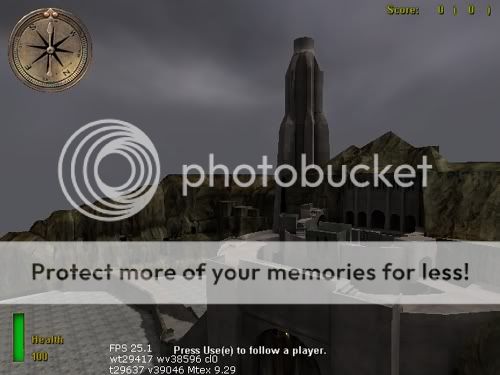
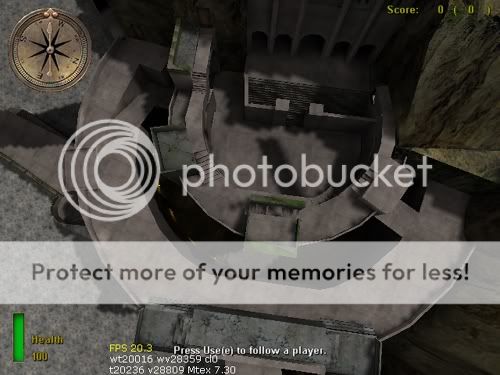
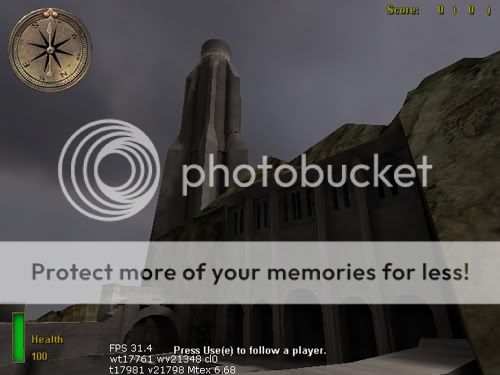
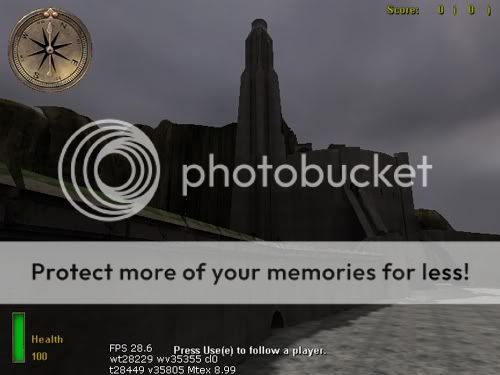
okay here are some pictures of my map. Its not that dark though. I still have some niks and nats to bug out but the makeup of it is almsot finished. And you can see its rather massive. And my fps was great, but when i remade my mountains useing simple patch mess instead of a regular brush, it dropped my fps very low. as you can see, they are all around 15-30fps. I have the mountains with a low complexity. So, I checked this link out, doing a search taking Bjarne BZR's advice and i found this on vis_leafgroups: /forum/viewtopic.php?t=7792&start=0
someone said in there that using leafgroups does not increase vis datasize that much. But when i tried it to lower my fps, it increased my dramatically over the limit. I used two vis boxes. Followed the instuctions on the tutorial very carefully and did everything as said. If you look at the pictures the one with the top view looking down I had one cylinder shape vis target inside of the caslte. Not quite all the way to the top, and another one on the outside covering most of my mountains top to bottom. I scripted so, if you were outside around the mountains or on the terrain it will not draw what is in the castle. And, if you are on the castle It will not draw the mountains unless you are at the very top of the caslte. This one attemt to increase my fps dramatically increaased the vis data size.
(and I was wondering if anyone thinks I am being a pain in the ass with my questions? cause i guess i have been asking a lot.)
Posted: Thu Jun 17, 2004 10:04 pm
by Bjarne BZR
Well, its hard to know from just pictures, but patch mesh can create a silly numberof faces unless used carefully... just dragging the wrong control point one unit in the wrong direction can double the copmlexity.
So:
1) Are you sure you sure you have a correct structural/detail setup?
2) Are the patch mesh overly complicated ( very bended )?
3) Are you mad? This must have taken you a looong time ( please say it did
)
Posted: Thu Jun 17, 2004 10:35 pm
by Wheat
LOL

Yes, I am very frustrated. THis is my first map, and it has taken me very long. I lost track of the hours I have put in this. It took lots of trial and error to get it set up rith too, it almost looks exactly like the one in the movie. Anyway, Bjarne BZR, you sound like you have been mapping for a while, and I was wondering if you be interested in helping me get this thing off the ground. I have AIM, and MSN messenger I can send you the .bsp file and we can go take a look at it. And, if you want, I can send the .map too. For AIM: TimmyTYrone. MSN:
aiwa240@hotmail.com. If you are intersted add me to your contacts and we can talk about finishing this project.
Posted: Thu Jun 17, 2004 10:41 pm
by Jack Ruby
Why exactly did you delete your brush mountains and replace them with meshes ?
Theres a brush terrain builder its called gensurf, some people swear by brush terrain, think Bal4r is one of those guys.
It might work out better for you than using meshes.
Heres a link to all my plugins, drop them in the plugins folder ( obviously
)
Hope some of them work out for you:
http://www.project313.co.uk/nazaire/plugins.zip
Posted: Fri Jun 18, 2004 1:44 am
by Wheat
Well, I used brushes because i was not very good at changing the patch mesh to look like mountains. Once I got some more practice with it I decided to use it. The benefit was that it looks more realistic. THe oppurtunity cost was lower fps.

I tried that plugin, its one i already have. The rogue plugin right?
Posted: Fri Jun 18, 2004 5:22 am
by Wheat
oh, and i am going to put on a charge in the sewer along the wall so it will blow up just like it does in the movie.
 [/img]