This tutorial will attempt to teach by example how to use the vis_leafgroup
entity. It will use less pictures and more full map file examples.
It is not a complete tutorial on how the VIS stage works. For an
easy to understand VIS stage explanation, check out "VIS
for dummies" by TheStorm.
Targeted vis_leafgroup brushes work like this ( very simplified
):
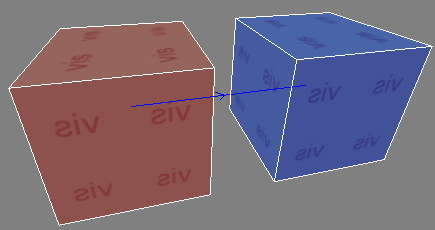
Imagine 2 invisible boxes. When the player is located inside one
box, nothing inside the other box is drawn. Simple!
( a vis_leafgroup brush targets another vis_leafgroup brush )
So why would you waste your precious time with this? Well: sometimes
the map compiler will have a rather different opinion on what can
be seen from a specific place in the map than you do... If you take
a look at the pictures in step 4 in the How
to do it section, you will see that a lot more than you think
is drawn by the game engine. This does not have to be a problem if
it does not drop the FPS a lot, but if it does: you will want to learn
about the magic of vis_leafgroup.
The fine print
Both boxes must have the common/vis texture.
Both boxes must be vis_leafgroups ( with the vis textured
brush selected, right click on the map grid and select vis->leafgroup
).
One ( or both ) box(es) should target the other.
Method 1: set a targetname on the brush that should
be targeted, and a target with the same value on the
targeting brush. Or you can also use the CTRL+k method below
after you gave the target your own name ( Radiant will use
the targetname you set ).
Method 2: Select first the targeting brush and then the
targeted brush and then press CTRL+k ( Konnect? )...
order is important!
The brush that is being targeted will hide its contents when
the player is in the brush that targets it ( 2 brushes may target
each other, and often will ).
A vis_leafgroup may target multiple other vis_leafgroups.
Only the faces completely inside the targeted vis_leafgroup
will be affected.
The boxes may have any shape ( does not need to be a box ).
vis_leafgroup does exactly as it is told. If the result is a
brush that is not drawn when it should: its your fault. Targeted
vis_leafgroups does not care if there is a blocking wall or not,
if you are in the targeting vis_leafgroup, the contents of the
targeted vis_leafgroup will not be drawn.
Script objects and other "dynamic content" in your
map may not be affected as expected by a targeted vis_leafgroup.
How to do it
The major part of this tutorial is a *.map file. This *.map file
contains a cut out part of the "Vemork factory objective"
map and how I solved the FPS drops, using targeted vis_leafgroups.
It is the hall around the distiller bomb objective, and it was a
major FPS low point in the map for 2 main reasons:
Complex brushwork. The distillers are made up of a lot of curved
surfaces, and there is lots of distillers. Thus: its a hard job
for the engine to draw it.
It is one of the central points in the map. Often there are
fire fights around the distillers as one of the Allied objectives
is to place a bomb here. Adding some frenzied soldiers with guns
blazing and some nade explosions does not help FPS.
So, how did I do it?
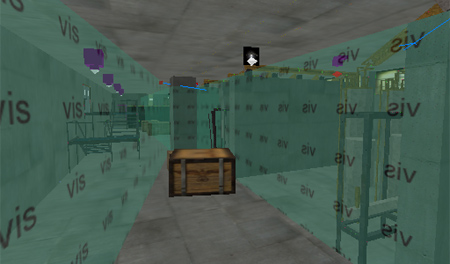
( how the vis brushes look in MOHRadiant )
Step 1) Early on I realized that to be able to pull this
of I would need to be able to limit visibility. As you can see straight
through the distiller racks, they would be virtually impossible
to optimize. So I added the concrete blocks behind every distiller.
So now I can tell MOHAA: "don't draw anything behind this"
without the player saying "Hey, that thing way over there just
popped out of existence, that's ugly!".
Step 2) Compile the map. ( WARNING! Dont use the
-fast switch for the VIS compile stage. If you do that the
VIS will not be as it should be in the final version, and it is
the VIS for the final version of the map we are optimizing here.
).
Step 3) Run MOHAA in development mode ( Start it with this
command: "MOHAA.exe +set developer 1 +set thereisnomonkey 1
+set cheats 1 +set ui_console 1" ) to be able to use the otherwise
"cheat protected" command in the next step. And
you must start the map by writing devmap
instead of the nomal map command (used when starting the
map via the menus ).
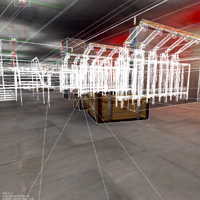
Step 4) Enter this command into the console window after
you loaded your map: r_showtris 2 ( deactivate it with r_showtris
0 ). This command lets you see all triangles that the engine
draws, even the ones behind that wall that you had no idea that
it drew...
Now you can see where it would be a good idea to place targeted
vis_leafgroups.
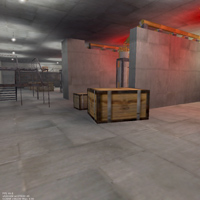
( Standard )
( with r_showtris 2 )
In the example above you can see that the complex brushwork behind
the concrete blocks are drawn even if the player has no chance of
actually seeing them...
Step 5) If you found some spots that could be optimized
better than the default vis compile: Go back to MOHRadiant and place
targeted vis_leafgroups at the most obviously FPS wasting places
that you found in step 4 and one at the position from where
the brushes should not be seen, and the return to step 2.
If you found no such spots: Go to the next step.
Step 6) If the FPS problem is fixed at this point: Congratulations!
If not, the basic construction of your map is probably flawed (
It may look GREAT, but players prefer good fun to good looks ( if
they must choose ) ). Go back to MOHRadiant and see if you cant
insert a wall somewhere or place a stack of boxes at a strategic
point to be able to block player view, and thus maybe get a better
chance to use some more effective targeted vis_leafgroups.
Good ideas
I found that you should always name the targetnames yourself. As
an example"distiller_hall_southwest" is a better name
than the name given by Radiant when using the CTRL+k method to target
brushes ( then they get crappy names like "mv1" &
"mv5" ). Because you will without a doubt end up with
more cross referenced vis_leafgroups than you had any idea about
when you started optimizing. So: give the vis_leafgroups good names
( not "oh_my_god_another_vis" but names denoting its intended
use or position, like "not_seen_from_distiller_ventilation"
).
Lets do it!
OK, now you know how to do it in theory. Next you must learn how
to do it in practice. I can't tell you how to do that, but I can
tell you how I did it... so download the example files below and
look at how I placed the VIS brushes after lots of compile ->
check -> redo -> compile -> check -> redo -> compile
-> check -> redo -> compile -> check ( I think you get
the point ).